
13 July 2026 · 5 min read
Wi-Fi control for your split system, and what it is good for
The phone apps for Daikin, Mitsubishi Electric and Mitsubishi Heavy Industries splits, what each needs, and the jobs where phone control earns its place.
By Mick McDonald, SPA Refrigeration
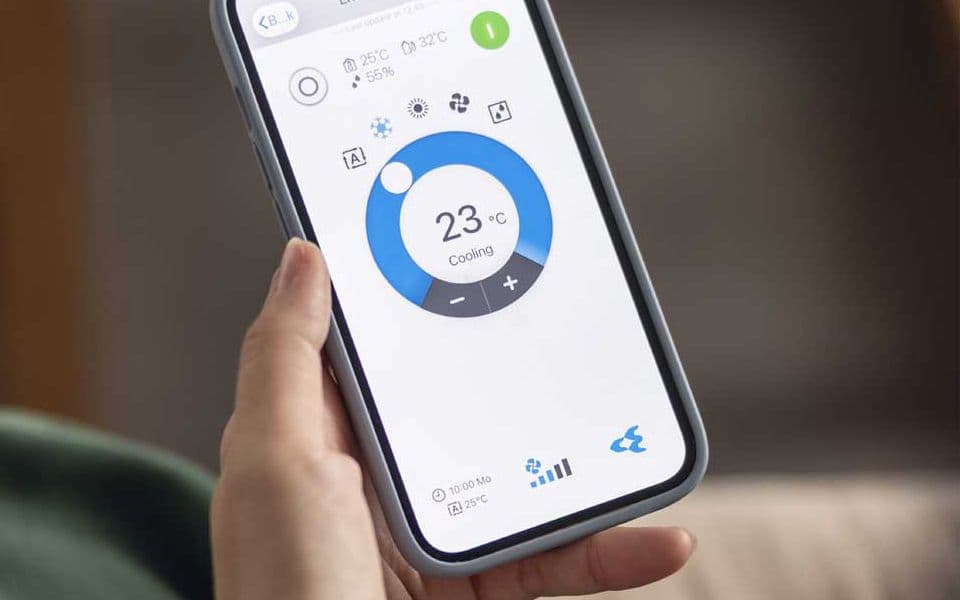
Coming home to a cold house is part of winter up here. A split system you can switch on from your phone on the drive back changes that, and it is the main reason people ask us about Wi-Fi control. The three brands we are asked about most each do it a little differently, and the differences matter when you are choosing a unit or adding control to one you already have.
What it is actually good for
Phone control earns its place in a few clear ways.
- Warming the house before you get home. Turn the heating on as you leave work, or set it to start before you are due back. Mitsubishi Electric makes the point that warming the house gradually on the way home beats walking into a cold room and turning the unit up high.
- Schedules that suit your week. Most apps let you set times for the unit to turn on and off, and change the set temperature, so the house is warm when you get up and not heated while it sits empty.
- Using your solar hours. If you have rooftop solar, a schedule that runs the heating or cooling in the middle of the day uses your own power to warm or cool the house before the evening. Our solar page covers how solar fits with heating and cooling.
- Checking you turned it off. The app shows whether the unit is running, so a worry on the highway is answered in a few seconds.
- Holiday houses and short stays. Warm the place before you arrive, and check it is off after you leave. That suits the guesthouses and weekenders around Daylesford and Hepburn Springs.
- Fault alerts. Some systems send a fault code to your phone, which helps when you ring us about a problem.
Daikin
Daikin's app is the Daikin Mobile Controller. It runs on Android and Apple phones and tablets, works over your home Wi-Fi or remotely with an internet connection, and can control up to ten indoor units, grouped if you like so they turn on and off together. Daikin also publishes the steps to link it with Amazon Alexa.
Whether you need extra hardware depends on the range:
- Zena and Alira X have the Wi-Fi module built into the indoor unit.
- Cora and Lite list the Mobile Controller as an optional extra, which means a wireless LAN adaptor fitted to each indoor unit. Daikin names the BRP072C42 adaptor for split and multi indoor units.
Our Daikin wall split guide covers the ranges in more detail.
Mitsubishi Electric
Mitsubishi Electric calls its system Wi-Fi Control, run through the Mitsubishi Electric Wi-Fi Control app. On most of its units it needs a Wi-Fi Control adaptor, one per indoor unit, which Mitsubishi Electric says connects to the unit's control board and should only be fitted by an authorised installer. It can be added when the unit is bought or retrofitted later to a compatible model. Its site notes the LN Series has the capability built in. It names the MAC-568IF-E adaptor as compatible with its M Series, P Series and City Multi indoor units made after January 2015.
A few details from Mitsubishi Electric's own FAQ are worth knowing:
- Rules, not just timers. You can set a minimum room temperature, so the unit switches itself on if a room drops below it overnight, and a maximum temperature rule for summer.
- One plug per unit. The adaptor uses the same connection as a wired wall controller, so a unit can have one or the other, not both.
- Your router matters. Setup uses the WPS function on your router, and a new router or a changed Wi-Fi password means pairing the adaptor again.
- It is not instant. Mitsubishi Electric says a command can take anywhere from one second to a minute to be actioned.
- Voice control. It works with Amazon Alexa and Google Assistant.
Mitsubishi Heavy Industries
Mitsubishi Heavy Industries uses the Smart M-Air app. Its Ciara wall split, released in Australia in late 2023, has Wi-Fi built in, and the app lets you set the temperature, set weekly timers, receive notifications and see power usage. MHI notes that what the app can do, and whether a given unit is compatible, varies between models, so check the product details or user manual for the model you are looking at. Older MHI units may need a separate adaptor, if one suits them at all.
Before you rely on it
- Wi-Fi reaches the unit. The indoor unit needs a decent signal. A bedroom at the far end of a stone or double brick house can be a dead spot.
- The internet stays up. Control from away goes over the internet, and Mitsubishi Electric's runs through its own cloud server, so if your internet drops the app cannot reach the unit until it is back.
- Check compatibility first. For an existing unit, give us the model number off the indoor unit's label and we can check whether an adaptor exists for it.
- Keep the remote. Phone control adds to the handheld remote, it does not replace it.
If you would like Wi-Fi control on a new split system, or want to know whether your current unit can take an adaptor, call us on 0417 734 206, Monday to Friday, 8:00am to 4:30pm, or contact us.
Mick McDonaldSPA Refrigeration & Air Conditioning
Want a hand with yours?
We install and service heating, cooling and refrigeration across Central Victoria from our base in Hepburn.